GUI Technical Documentation
This document describes the architecture, widget structure, and implementation details of the Vexy Lines Run GUI application.
Architecture overview
The GUI is a single-window CustomTkinter application. The App class owns the entire widget tree, manages internal state, and dispatches export work to a background thread via processing.py.
launch()
  └─ App.__init__()
       ├─ _build_layout()        # constructs all widgets
       ├─ _register_drop_targets()   # sets up drag-and-drop
       └─ mainloop()             # Tk event loop

User clicks Export ▶
  └─ _do_export()
       ├─ file dialog (save-as or folder)
       ├─ gather state (mode, paths, format, size, audio, range)
       ├─ disable button
       └─ threading.Thread(target=_run_export, daemon=True)
            └─ process_export(...)
                 ├─ on_progress → self.after(0, _update_progress)
                 ├─ on_complete → self.after(0, _export_complete)
                 └─ on_error   → self.after(0, _export_error)
The App class inherits from customtkinter.CTk. When tkinterdnd2 is available, it also mixes in TkinterDnD.DnDWrapper via a dynamically constructed base class tuple and a custom metaclass (_AppMeta).
Widget hierarchy
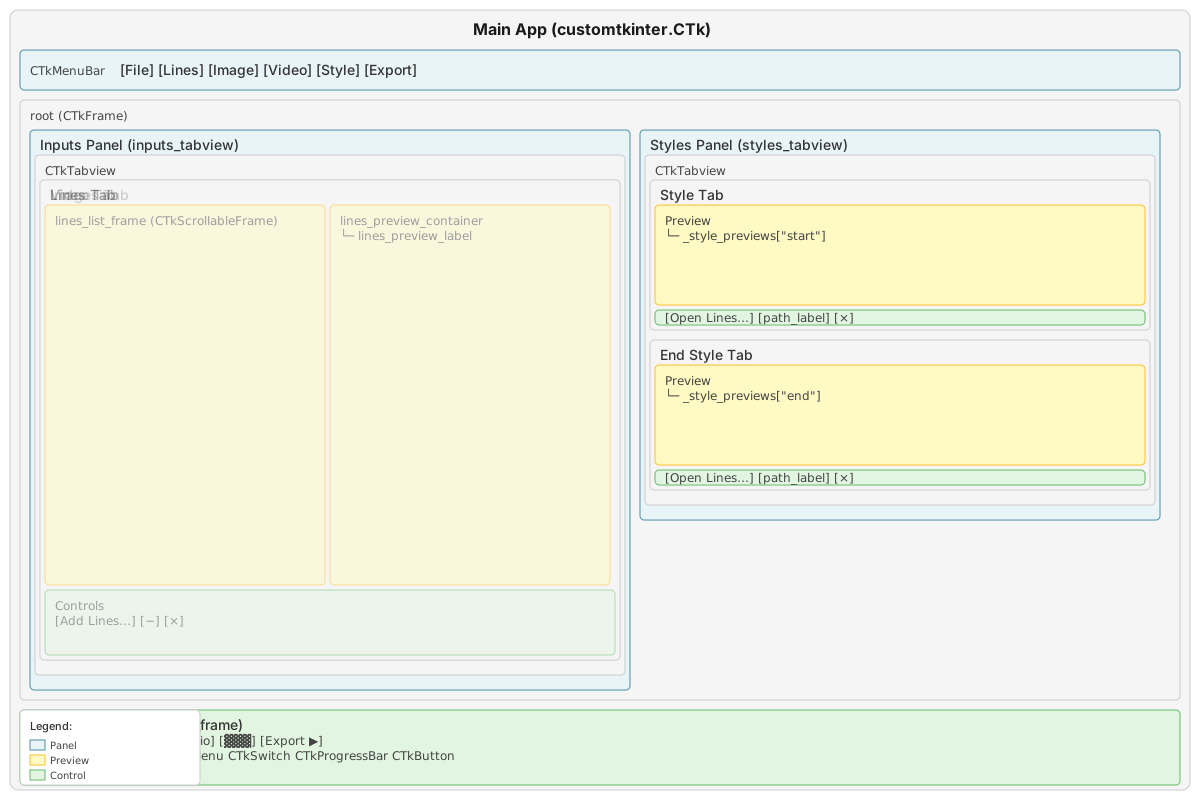
Root level
App (customtkinter.CTk + optional TkinterDnD.DnDWrapper)
├── CTkMenuBar
└── root (customtkinter.CTkFrame, fg_color="transparent")
    ├── inputs_tabview (CTkTabview)
    │   ├── Lines Tab
    │   │   ├── content_frame (CTkFrame)
    │   │   │   ├── lines_list_frame (CTkScrollableFrame)
    │   │   │   └── lines_preview_label (CTkLabel)
    │   │   └── controls_frame (CTkFrame)
    │   │       ├── + button (CTkButton, _choose_lines)
    │   │       ├── − button (CTkButton, _remove_selected_lines)
    │   │       └── ✕ button (CTkButton, _clear_all_lines)
    │   ├── Images Tab
    │   │   ├── content_frame (CTkFrame)
    │   │   │   ├── images_list_frame (CTkScrollableFrame)
    │   │   │   └── images_preview_label (CTkLabel)
    │   │   └── controls_frame (CTkFrame)
    │   │       ├── + button (CTkButton, _choose_images)
    │   │       ├── − button (CTkButton, _remove_selected_image)
    │   │       └── ✕ button (CTkButton, _clear_all_images)
    │   └── Video Tab
    │       ├── previews_frame (CTkFrame)
    │       │   ├── video_first_preview (CTkLabel)
    │       │   └── video_last_preview (CTkLabel)
    │       └── controls_frame (CTkFrame)
    │           ├── range_row (CTkFrame, fg_color="transparent")
    │           │   ├── video_start_entry (CTkEntry, width=60)
    │           │   ├── video_range_slider (CTkRangeSlider)
    │           │   ├── video_count_label (CTkLabel)
    │           │   └── video_end_entry (CTkEntry, width=60)
    │           └── path_row (CTkFrame, fg_color="transparent")
    │               ├── + button (CTkButton, _choose_video)
    │               ├── video_path_label (CTkLabel)
    │               └── ✕ button (CTkButton, _clear_video)
    ├── styles_tabview (CTkTabview)
    │   ├── Style Tab (key="start")
    │   │   ├── content_frame (CTkFrame)
    │   │   │   └── _style_previews["start"] (CTkLabel)
    │   │   └── controls_frame (CTkFrame)
    │   │       ├── + button (CTkButton, _choose_style_file("start"))
    │   │       ├── _style_labels["start"] (CTkLabel)
    │   │       └── ✕ button (CTkButton, _clear_style_file("start"))
    │   └── End Style Tab (key="end")
    │       ├── content_frame (CTkFrame)
    │       │   └── _style_previews["end"] (CTkLabel)
    │       └── controls_frame (CTkFrame)
    │           ├── + button (CTkButton, _choose_style_file("end"))
    │           ├── _style_labels["end"] (CTkLabel)
    │           └── ✕ button (CTkButton, _clear_style_file("end"))
    └── bottom_frame (CTkFrame)
        ├── "Export as" label (CTkLabel)
        ├── format_menu (CTkOptionMenu, values=SVG/PNG/JPG/MP4/LINES)
        ├── size_menu (CTkOptionMenu, values=—/1x/2x/3x/4x)
        ├── audio_toggle (CTkSwitch, text="♪")
        └── convert_button (CTkButton, text="Export ▶")
Key components
1. Menu bar (CTkMenuBar)
Built using CTkMenuBar from CTkMenuBarPlus with CustomDropdownMenu for submenu support. Six cascading menus:
- File: Add Lines, Export ▶, Quit
- Lines: Add Lines, Remove Selected, Remove All Lines
- Image: Add Images, Remove Selected, Remove All Images
- Video: Add Video, Reset Range, Remove Video
- Style: Open Style, Open End Style, Reset Styles
- Export: Export ▶, Location, Format (submenu with SVG/PNG/JPG/MP4/LINES), Size (submenu with 1x/2x/3x/4x), Audio (submenu with On/Off)
Menu items call the same methods as their button counterparts. The menu helper methods (_menu_add_lines, _menu_add_images, _menu_add_video) first switch to the relevant tab, then open the file dialog.
2. Inputs panel (inputs_tabview)
A three-tab CTkTabview switching between input modes:
Lines tab
- List frame:
CTkScrollableFramecontainingCTkLabelwidgets for each .lines file. Click to select (highlighted in blue). - Preview label: Shows selected file's embedded preview image via
CTkLabelwithCTkImage. - Controls: +, −, ✕ buttons.
Images tab
- List frame: Same structure as Lines tab, but for image files.
- Preview label: Shows selected image thumbnail.
- Controls: +, −, ✕ buttons.
Video tab
- Previews: Two side-by-side
CTkLabelwidgets showing first and last frames of the selected range. - Range controls:
CTkEntryfor start frame,CTkRangeSlider(custom widget), frame count label,CTkEntryfor end frame. All on a single row. - Path controls: + button, path label (truncated), ✕ button.
3. Styles panel (styles_tabview)
Two-tab CTkTabview for start/end style selection. Each tab is built by _build_style_picker(tab, key) with:
- Preview:
CTkLabeldisplaying the style's preview image. - Controls: + button, truncated path label, ✕ button.
The entire panel is disabled (grayed out) when the Lines tab is active. The _update_styles_panel_state() method iterates through all child widgets and sets their state to "disabled" or "normal".
4. Output section (bottom_frame)
A single horizontal frame with:
- "Export as" label
- Format menu:
CTkOptionMenuwith all five format options always visible. - Size menu:
CTkOptionMenu. Shows "—" (disabled) for SVG/LINES; shows 1x/2x/3x/4x (enabled) for raster formats. - Audio toggle:
CTkSwitchwith text "♪". Visibility is conditional (see Audio Toggle Visibility below). - Export button:
CTkButton, red theme (fg_color="#D32F2F",hover_color="#B71C1C"), text changes during export to show progress.
Thread safety
Background export thread
Export runs on a daemon threading.Thread spawned from _do_export(). The thread calls process_export() from processing.py, which blocks until complete.
The three callback parameters use self.after(0, ...) to marshal UI updates back to the main Tk thread:
on_progress=lambda cur, tot, msg: self.after(0, self._update_progress, cur, tot, msg)
on_complete=lambda msg: self.after(0, self._export_complete, msg)
on_error=lambda msg: self.after(0, self._export_error, msg)
self.after(0, callback) schedules the callback on the Tk event loop's next iteration, guaranteeing it runs on the main thread. This is the only safe way to update tkinter widgets from a background thread.
No abort mechanism
The current implementation disables the Export button during export but does not provide a way to cancel a running export. There is no abort_event or stop button. The button re-enables on completion or error.
State accessed by the background thread
The background thread reads (but does not write) these attributes at spawn time via closure:
self._output_pathself.format_var.get()self.size_var.get()self.audio_var.get()self._video_range
Because these are read once at thread start and the UI is disabled during export, there are no race conditions.
CustomTkinter theming
Dark mode
launch() calls customtkinter.set_appearance_mode("dark") before creating the App. This sets the global theme to dark mode. All CustomTkinter widgets inherit the dark palette automatically.
Color scheme
| Element | Color | Notes |
|---|---|---|
| Window background | Inherited from CTk dark theme | Dark slate |
| Root frame | fg_color="transparent" |
Inherits parent |
| Placeholder images | #1d1f22 |
Dark grey, created by create_placeholder_image() |
| Export button resting | #D32F2F fg, #B71C1C hover |
Red theme |
| Selected file row | Blue highlight | Via CTkLabel configuration |
Layout grid
The root frame uses a 2-column, 2-row grid:
Column 0 (weight=3): inputs_tabview  | Column 1 (weight=1): styles_tabview
Row 0 (weight=1):    [tabviews fill available space]
Row 1 (weight=0):    bottom_frame (spans both columns)
The 3:1 weight ratio gives the input panel roughly three-quarters of the width.
CTkRangeSlider custom widget
A dual-handle range slider bundled in widgets.py. Ported from Akash Bora's CTkRangeSlider (version 0.3) and bundled to avoid an external dependency.
Implementation
- Base class:
CTkBaseClassfrom CustomTkinter's core widget classes. - Drawing engine: A custom
CustomDrawEngineclass that wrapsCTkCanvasand draws rounded rectangles for the track and circular thumbs. - Platform-specific rendering:
- macOS:
circle_shapes(preferred) orfont_shapes - Other platforms:
font_shapesorpolygon_shapes - Mouse interaction: Binds
<Button-1>,<B1-Motion>,<ButtonRelease-1>,<Enter>,<Leave>on the canvas. Click anywhere on the track to jump the nearest thumb. Drag to slide. - Value clamping: The low thumb cannot exceed the high thumb and vice versa.
- Step quantization: When
number_of_stepsis set, values snap to discrete positions usinground(value * steps) / steps.
Integration with the Video tab
The slider is created with from_=0, to=1 and maps to the video's frame range. When the slider value changes (_on_video_slider_change), the normalised 0–1 values are scaled to 1-indexed frame numbers. A _syncing_video_controls flag prevents update loops between the slider and the text entries.
Variable binding
Supports two-way binding with tk.IntVar or tk.DoubleVar via the variables parameter (a tuple of two variables for low and high values). Variable changes update the slider, and slider changes update the variables.
Drag-and-drop implementation
How it works
When tkinterdnd2 is available, _register_drop_targets() registers multiple widgets per tab as drop targets:
- The tab frame itself
- The list frame (scrollable frame + its internal
_scrollable_frame) - The preview label
- For video: both preview labels and the path label
Each target gets drop_target_register(DND_FILES) and a <<Drop>> event binding to a handler (_on_lines_drop, _on_images_drop, _on_video_drop).
Path parsing
Drop data from tkinterdnd2 can arrive in two formats:
- Brace-enclosed: {/path/to/my file.png} (paths with spaces)
- Space-separated: /path/one.png /path/two.png
The drop handlers parse both formats. Duplicate paths are filtered out before adding to the list.
Graceful degradation
If tkinterdnd2 is not installed, TkinterDnD is set to None at import time, and _register_drop_targets() returns immediately. No error, no crash: the app lacks drag-and-drop. Users can still add files via buttons and menus.
Video processing pipeline
When the GUI dispatches a video export, the processing module handles the heavy lifting:
MP4 output (_process_video_to_mp4)
For each frame in range:
    1. Read frame from source video (OpenCV VideoCapture)
    2. Save frame as temporary PNG
    3. If end_style: interpolate style at t = frame_position / total_frames
    4. apply_style(client, style, tmp_png) → SVG string (via MCP)
    5. _svg_to_pil(svg_string, width, height) → PIL Image (via svglab or resvg-py)
    6. Convert PIL Image → OpenCV BGR frame
    7. Write frame to output (OpenCV VideoWriter, mp4v codec)
    8. Delete temporary PNG

After all frames:
    If audio and full range:
        ffmpeg -i video_only.mp4 -i original.mp4 -c:v copy -c:a aac → merged.mp4
    Else:
        Move video_only.mp4 to output path
Frame image output (_process_video_to_frames)
Same per-frame loop but writes individual image files (frame_000001.svg, frame_000001.png, etc.) instead of feeding into a VideoWriter.
SVG rasterisation (_svg_to_pil)
Two backends, tried in order:
- svglab: Parses SVG, sets width/height, calls
render(). Handles mm-unit dimensions natively. - resvg-py (fallback): Patches mm dimensions to px in the SVG string, writes to a temp file, calls
svg_to_bytes(). Decodes PNG bytes with Pillow.
Both backends resize the result to the target dimensions with Lanczos resampling if needed.
Audio merge
Audio passthrough uses ffmpeg as a subprocess:
ffmpeg -y -i video_only.mp4 -i original.mp4 -c:v copy -c:a aac -map 0:v:0 -map 1:a:0 -shortest merged.mp4
Audio detection uses ffprobe to check for audio streams in the source video. If ffprobe is not available, has_audio defaults to False.
UI state transitions
Tab switching (_on_inputs_tab_changed)
When switching between input tabs: 1. Update audio toggle visibility (only shown on Video tab with MP4 format and full range) 2. Update styles panel state (disabled on Lines tab, enabled on Images/Video)
Note: The format dropdown does not filter its options per tab. All five formats (SVG, PNG, JPG, MP4, LINES) are always available.
Format changes (_on_format_change)
When the export format changes: 1. Update size dropdown: vector formats (SVG, LINES) disable it and show "—"; raster formats (PNG, JPG, MP4) enable it with 1x–4x options 2. Update audio toggle visibility
Audio toggle visibility (_update_audio_toggle_visibility)
The audio switch is shown only when ALL conditions are true: - Video tab is active - A video is loaded with frames > 0 - The video has an audio track - Export format is MP4 - Full video range is selected (1 to total frames)
The visibility check runs on a 300ms polling timer (_poll_active_tab) in addition to being called on tab and format changes.
Responsive layout
Resize handling
<Configure>event fires on any window resize- A debounced handler (
_on_resize) schedules_resize_refresh()after 70ms, cancelling any pending refresh _resize_refresh()updates:- Image list layout (repacks rows with new widths)
- Lines list layout (same)
- Path label truncation (re-calculates character limits based on widget pixel width)
- All preview images are redrawn to fit new container sizes
Path truncation
Two truncation functions:
truncate_start(text, max_chars): trims leading characters:
def truncate_start(text: str, max_chars: int = 20) -> str:
    if len(text) <= max_chars:
        return text
    return f"…{text[-max_chars:]}"
truncate_middle(text, max_width): replaces the middle with "⋮":
def truncate_middle(text: str, max_width: int) -> str:
    if len(text) <= max_width:
        return text
    keep = max_width - 1
    left = keep // 2
    right = keep - left
    return f"{text[:left]}⋮{text[-right:]}"
Font metrics are computed at init time using tkfont.nametofont() on the default CTkLabel font, enabling pixel-accurate truncation calculations.
State management
Internal state variables
| Variable | Type | Description |
|---|---|---|
_style_paths |
dict[str, str \| None] |
Maps "start"/"end" to file paths |
_style_labels |
dict[str, CTkLabel] |
Path display labels per style slot |
_style_previews |
dict[str, CTkLabel] |
Preview image labels per style slot |
_style_default_text |
dict[str, str] |
Placeholder text: {"start": "Style", "end": "End Style"} |
_image_paths |
list[str] |
Image file paths |
_image_rows |
list[CTkLabel] |
Row widgets in the image list |
_selected_image_index |
int \| None |
Currently selected image index |
_lines_paths |
list[str] |
Lines file paths |
_lines_rows |
list[CTkLabel] |
Row widgets in the lines list |
_selected_lines_index |
int \| None |
Currently selected lines index |
_video_path |
str |
Current video file path (empty string if none) |
_video_total_frames |
int |
Total frame count of loaded video |
_video_has_audio |
bool |
Whether the loaded video has an audio stream |
_video_range |
tuple[int, int] |
Selected frame range (1-indexed, inclusive) |
_syncing_video_controls |
bool |
Guard flag to prevent update loops |
_output_path |
str |
Last selected output path |
Tkinter variables
| Variable | Type | Description |
|---|---|---|
format_var |
tk.StringVar |
Current export format, initial value "SVG" |
size_var |
tk.StringVar |
Current size multiplier, initial value "—" |
audio_var |
tk.BooleanVar |
Include audio, initial value True |
Window lifecycle
Initialization
App.__init__() calls, in order:
1. super().__init__(): creates the Tk window
2. TkinterDnD initialization (if available)
3. Window configuration: title, geometry (900x700), minsize (960x480)
4. State variable initialization
5. Font metrics setup for truncation
6. _build_layout(): constructs all widgets
7. _register_drop_targets(): sets up drag-and-drop
8. Initial state updates (size dropdown, audio toggle, styles panel)
9. <Configure> event binding for resize handling
10. Raise to front: lift(), attributes("-topmost", True), then after 200ms set -topmost back to False
Launch
launch() sets dark appearance mode, creates the App, lifts it again (belt and suspenders), and enters mainloop().
Key method architecture
Layout builders
_build_layout(): top-level structure (root frame, grid)_build_menu_bar(): menu construction with CTkMenuBar_build_inputs_panel(): tabview with three tabs_build_lines_tab(): lines-specific widgets_build_images_tab(): image-specific widgets_build_video_tab(): video-specific widgets_build_styles_panel(): style tabview with two tabs_build_style_picker(): reusable per-slot style picker_build_outputs_section(): export controls bar
Export flow
_do_export(): file dialog, gather state, spawn thread_run_export(): background thread entry point_update_progress(): update button text with percentage (main thread)_export_complete(): re-enable button (main thread)_export_error(): re-enable button, show error dialog (main thread)
Video range management
_set_video_range(): validates and sets range, updates slider/entries/previews_on_video_slider_change(): handles slider input, converts normalised values to frame numbers_on_video_entries_submit(): handles text entry input (Return key or focus-out)_syncing_video_controls: flag to prevent circular updates between slider and entries
Image management
_set_label_image(): fits and sets a PIL image on a CTkLabelfit_image_to_box(): aspect-ratio-preserving scale onto a dark canvas_redraw_*_preview(): refresh specific preview widgets after selection or resize
File extension constants
Defined at module level:
IMAGE_EXTENSIONS = {".png", ".jpg", ".jpeg", ".gif", ".bmp", ".tiff", ".webp"}
VIDEO_EXTENSIONS = {".mp4", ".mov", ".avi", ".mkv", ".webm"}
LINES_EXTENSIONS = {".lines"}
Dependencies
Required (installed with the package)
| Package | Purpose |
|---|---|
customtkinter |
Modern tkinter wrapper with dark mode |
CTkMenuBarPlus |
Enhanced menu bar with cascading dropdown menus |
Pillow (PIL) |
Image loading, thumbnails, format conversion |
loguru |
Debug logging |
vexy-lines-apy |
MCP client and style engine bindings |
Required for video processing
| Package | Purpose |
|---|---|
opencv-python-headless (cv2) |
Video frame reading and writing |
svglab or resvg-py |
SVG-to-raster conversion |
numpy |
Array conversion between PIL and OpenCV |
Optional
| Package | Purpose |
|---|---|
tkinterdnd2 |
Drag-and-drop support. Falls back gracefully if missing. |
ffmpeg (system binary) |
Audio track merging for MP4 output |
ffprobe (system binary) |
Audio stream detection in source videos |